Connecting the products
Where and in what order Galpi, Mothership and Naru connect. Entering an address grants nothing; connections, approvals and trusts are made by people.
Alone and together
| Alone | What connecting adds | |
|---|---|---|
| Galpi | Chats, previews, skills, MCP connections | Mothership app projects (build, preview, review candidates), Naru pack projects (submit, run on dev), Naru toolsets in chats |
| Mothership | Apps by ZIP upload or source build, companies, permissions, AI, connectors | Development work from Galpi projects, Naru toolsets as company connectors |
| Naru | Toolsets from any MCP client, pack development with the naru CLI |
Pack development and tools in Galpi, calls in the person's name from Mothership apps |
None depends on another's server at runtime. When a connected product is down, only that connection stops.
Where things connect
| Connection | Who | Where | What is exchanged |
|---|---|---|---|
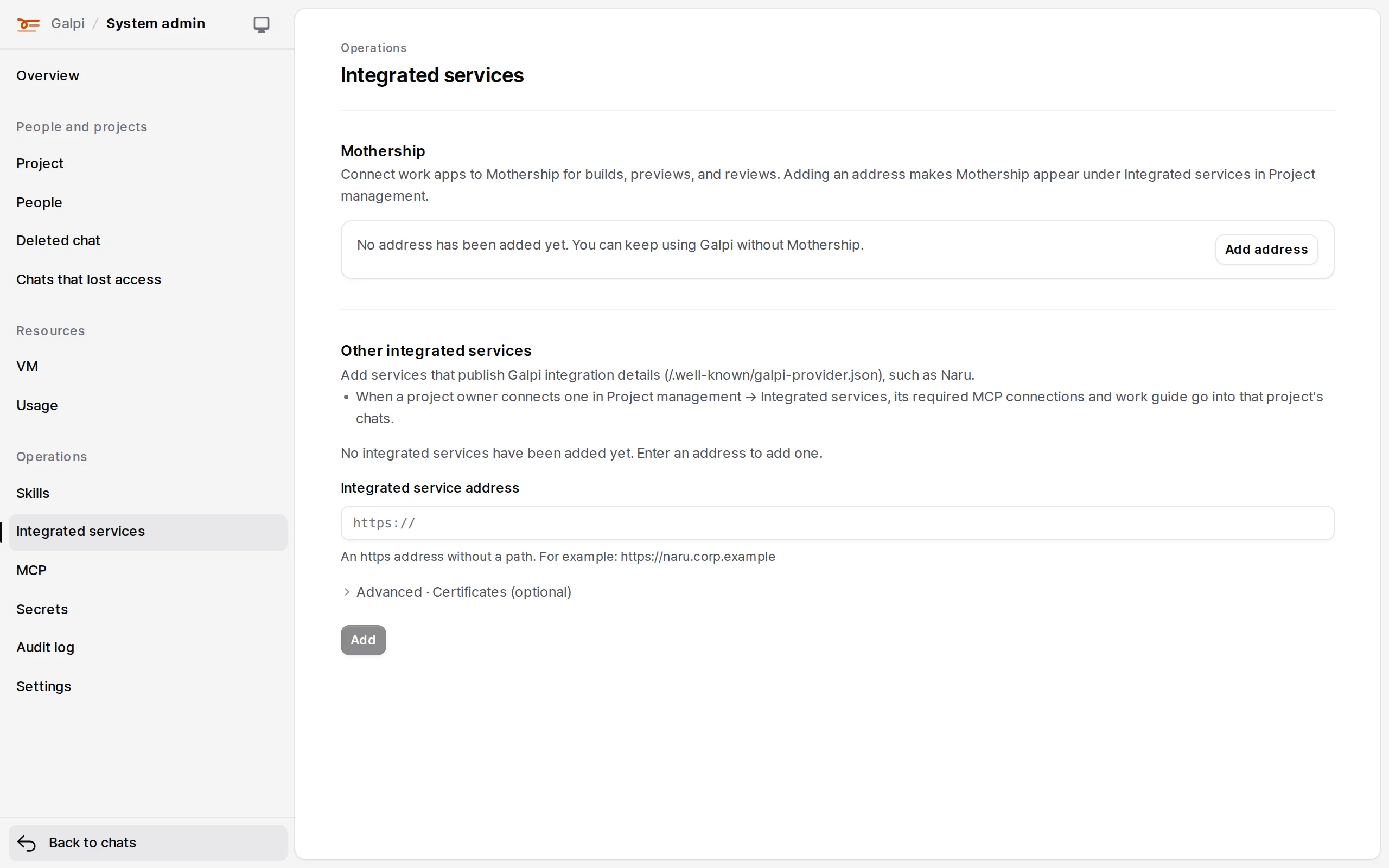
| Galpi → Mothership | Galpi system administrator | Galpi System admin → Integrated services | One Mothership address |
| Project owner, then each member | Galpi Project settings → Integrated services → Mothership → Connect from Mothership | A 30-day development delegation (build, preview, review candidates). Production rights are never handed over | |
| Mothership company owner or admin | Allow this address on Mothership's approval page (once), then on/off in Company settings → Development tools | Galpi allowed as the company's development tool | |
| Galpi → Naru (pack development) | Galpi system administrator | Naru's address in Galpi System admin → Integrated services | Naru's integration manifest (/.well-known/galpi-provider.json) |
| Project owner, then each member | Galpi Project settings → Integrated services → Naru → Connect; members sign in from the MCP list | A development token (OAuth) bound to one pack, work instructions, commit submission | |
| Galpi chats → Naru (tools) | Naru admin, Galpi system administrator | Naru People and tokens → Trust → Connect Galpi, Galpi System admin → MCP | Service token and signing key (signed user identity), or OAuth per person |
| Mothership → Naru | Naru admin | Naru People and tokens → Trust → Connect Mothership | Toolset address, service token, signing key (shown once) |
| Mothership company admin | Mothership Company admin → External tools → New connection; its connection ID goes into Naru's trust | A signed assertion of the person, per-tool risk | |
| Golden Image → Mothership | App developer | Mothership Work apps → Catalog → Add app with the ZIP | A candidate version |
| Golden Image → Galpi | Galpi operator | GALPI_MOTHERSHIP_PROFILES_FILE on the Galpi server |
Approved profiles for new apps' first source and base updates |
Building Mothership apps with Galpi
- A Galpi system administrator enters the Mothership address in System admin → Integrated services (or
MOTHERSHIP_URL). On Mothership, allow Galpi in advance withGALPI_URL, or a company administrator chooses Allow this address on first approval. - The project owner chooses Project settings → Integrated services → Mothership → Connect from Mothership. On Mothership's approval page they pick the company and an existing or new app and approve development work only.
- Each member then approves their own delegation in the same place. It lasts 30 days and covers build, preview and review candidates.
- When the chat's agent changes the app repository, Galpi sends its source to Mothership as a ZIP. Mothership builds it, and Galpi asks for a preview and a review candidate from that build. Shared validation and production are done by people in Mothership.
Galpi only sends a source ZIP: a commit (git archive) or a snapshot of the folder being worked on. Mothership builds it with its own pinned toolchain image and checks the approved profile's managed files again on the server. So this flow needs a source build executor in Mothership; without one, build requests are not processed and wait. → Mothership install: source builds and app backends
Building Naru packs in Galpi
- A Galpi system administrator adds Naru's address in System admin → Integrated services (or
NARU_URL). One Galpi connects to one Naru. - The project owner picks one pack with Project settings → Integrated services → Naru → Connect.
- Members sign in from Naru · required · integrated service in the MCP list.
- The chat's agent changes the pack, tests it with fixtures, submits the commit to Naru and deploys to dev. Production is up to Naru administrators.
More: Naru: with Galpi and Mothership
Addresses with one name
| Name | Read by | Meaning |
|---|---|---|
GALPI_URL |
Mothership | This Galpi may request development connections |
MOTHERSHIP_URL |
Galpi | Mothership appears under a project's integrated services |
NARU_URL |
Galpi, Mothership, the Naru CLIs | Galpi registers Naru as an integrated service at start; Mothership company admins may connect it as an external tool |
Setting these grants nothing. The project owner's connection, the company administrator's approval and Naru's trust are still done by people.